> ## Documentation Index
> Fetch the complete documentation index at: https://docs.protectorplus.cloudsine.tech/llms.txt
> Use this file to discover all available pages before exploring further.
# Account & Role Management
> Local accounts, Enterprise SSO, and the role-based access matrix.
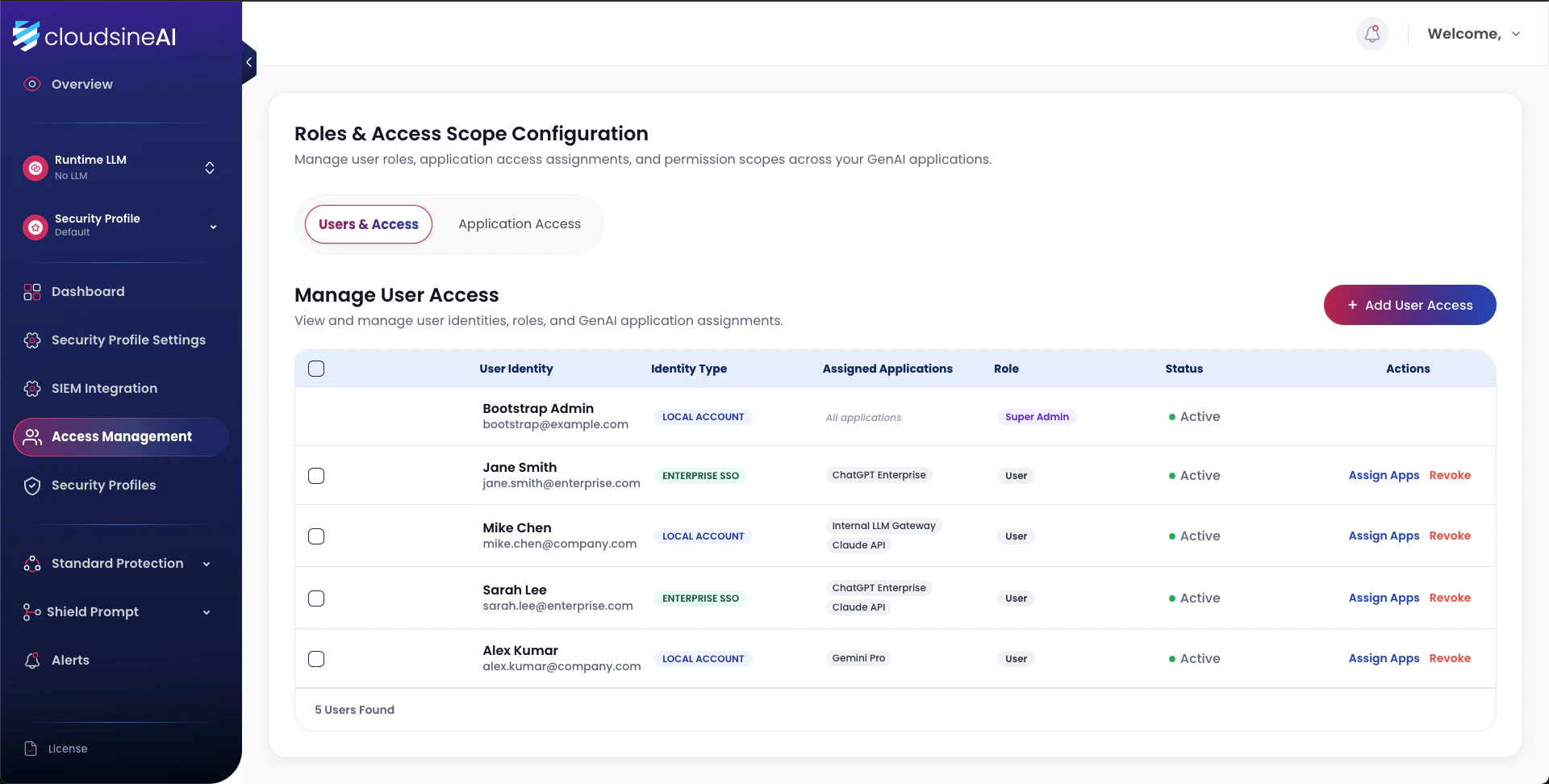
Protector Plus supports two identity types and two role tiers. Local accounts are used for bootstrap and break-glass; Enterprise SSO is the recommended production identity source.
 ## Identity types
| Identity type | Authentication |
| --------------------------- | -------------------------------------------------------------------------------------------------------------- |
| **Local dashboard account** | Credentials managed within Protector Plus. The initial admin is a local account for bootstrap and break-glass. |
| **Enterprise SSO** | Authenticates against your IdP. Bind once; identities are then granted roles within Protector Plus. |
## Roles
| Role | Scope |
| --------------- | ----------------------------------------------------------------------------------------------------------------------------------------- |
| **Super Admin** | Global. View/manage all profiles, all logs, all applications. The only role permitted to bind applications to profiles or configure SIEM. |
| **App User** | Bounded to assigned applications. View/manage profile settings and logs for those applications only. |
## Adding a user
## Identity types
| Identity type | Authentication |
| --------------------------- | -------------------------------------------------------------------------------------------------------------- |
| **Local dashboard account** | Credentials managed within Protector Plus. The initial admin is a local account for bootstrap and break-glass. |
| **Enterprise SSO** | Authenticates against your IdP. Bind once; identities are then granted roles within Protector Plus. |
## Roles
| Role | Scope |
| --------------- | ----------------------------------------------------------------------------------------------------------------------------------------- |
| **Super Admin** | Global. View/manage all profiles, all logs, all applications. The only role permitted to bind applications to profiles or configure SIEM. |
| **App User** | Bounded to assigned applications. View/manage profile settings and logs for those applications only. |
## Adding a user
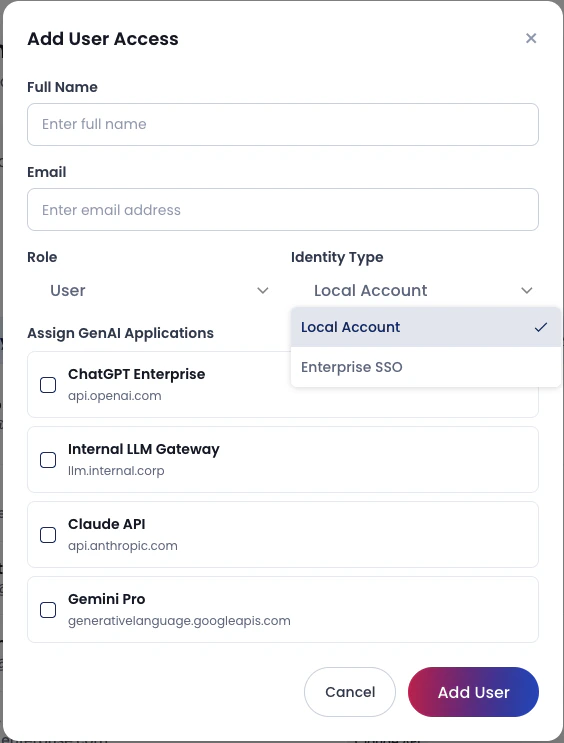 Available to Super Admin only.
**Local Account** for break-glass; **Enterprise SSO** for normal production users.
Select role (Super Admin or App User) and tick the applications the user should access.
The binding is active immediately.
## Access matrix (TDD)
| Identity | Role | View profile | Change profile settings | Create profile | View security logs | Manage app bindings | Assign Super Admin | SIEM config |
| -------- | ----------- | ------------ | ----------------------- | -------------- | ------------------ | ------------------- | ------------------ | ----------- |
| Local | Super Admin | All apps | All apps | Yes | All apps | Yes | Yes | Yes |
| SSO | Super Admin | All apps | All apps | Yes | All apps | Yes | Yes | Yes |
| Local | App User | Bounded only | Bounded only | No | Bounded only | No | No | No |
| SSO | App User | Bounded only | Bounded only | No | Bounded only | No | No | No |
## Dashboard role matrix (User Guide)
A simplified per-page matrix used by the dashboard:
| Role | View alert | Create account | View access log | Modify guardrail | Modify LLM | Generate API key |
| ----- | ---------- | -------------- | --------------- | ---------------- | ---------- | ---------------- |
| User | Yes | No | No | No | No | No |
| Admin | Yes | Yes | Yes | Yes | Yes | Yes |
## Audit trail
Open **Profile → Access Logs** to view dashboard account activity (logins, profile changes, API-key generations). Export to CSV from the bottom of the page for offline retention.
## Bootstrap recovery
The initial local Super Admin remains available even after SSO is bound, providing a break-glass entry point for recovery scenarios. Treat the local admin credential as sensitive — store it in your secrets vault.
Available to Super Admin only.
**Local Account** for break-glass; **Enterprise SSO** for normal production users.
Select role (Super Admin or App User) and tick the applications the user should access.
The binding is active immediately.
## Access matrix (TDD)
| Identity | Role | View profile | Change profile settings | Create profile | View security logs | Manage app bindings | Assign Super Admin | SIEM config |
| -------- | ----------- | ------------ | ----------------------- | -------------- | ------------------ | ------------------- | ------------------ | ----------- |
| Local | Super Admin | All apps | All apps | Yes | All apps | Yes | Yes | Yes |
| SSO | Super Admin | All apps | All apps | Yes | All apps | Yes | Yes | Yes |
| Local | App User | Bounded only | Bounded only | No | Bounded only | No | No | No |
| SSO | App User | Bounded only | Bounded only | No | Bounded only | No | No | No |
## Dashboard role matrix (User Guide)
A simplified per-page matrix used by the dashboard:
| Role | View alert | Create account | View access log | Modify guardrail | Modify LLM | Generate API key |
| ----- | ---------- | -------------- | --------------- | ---------------- | ---------- | ---------------- |
| User | Yes | No | No | No | No | No |
| Admin | Yes | Yes | Yes | Yes | Yes | Yes |
## Audit trail
Open **Profile → Access Logs** to view dashboard account activity (logins, profile changes, API-key generations). Export to CSV from the bottom of the page for offline retention.
## Bootstrap recovery
The initial local Super Admin remains available even after SSO is bound, providing a break-glass entry point for recovery scenarios. Treat the local admin credential as sensitive — store it in your secrets vault.